Understand how written work came together
WriteID connects Google Classroom and Google Docs, organizes document-development activity, and creates AI-assisted authorship reports for educator-led review.
WriteID intends to eliminate and use of in the authorship of scholarly works.
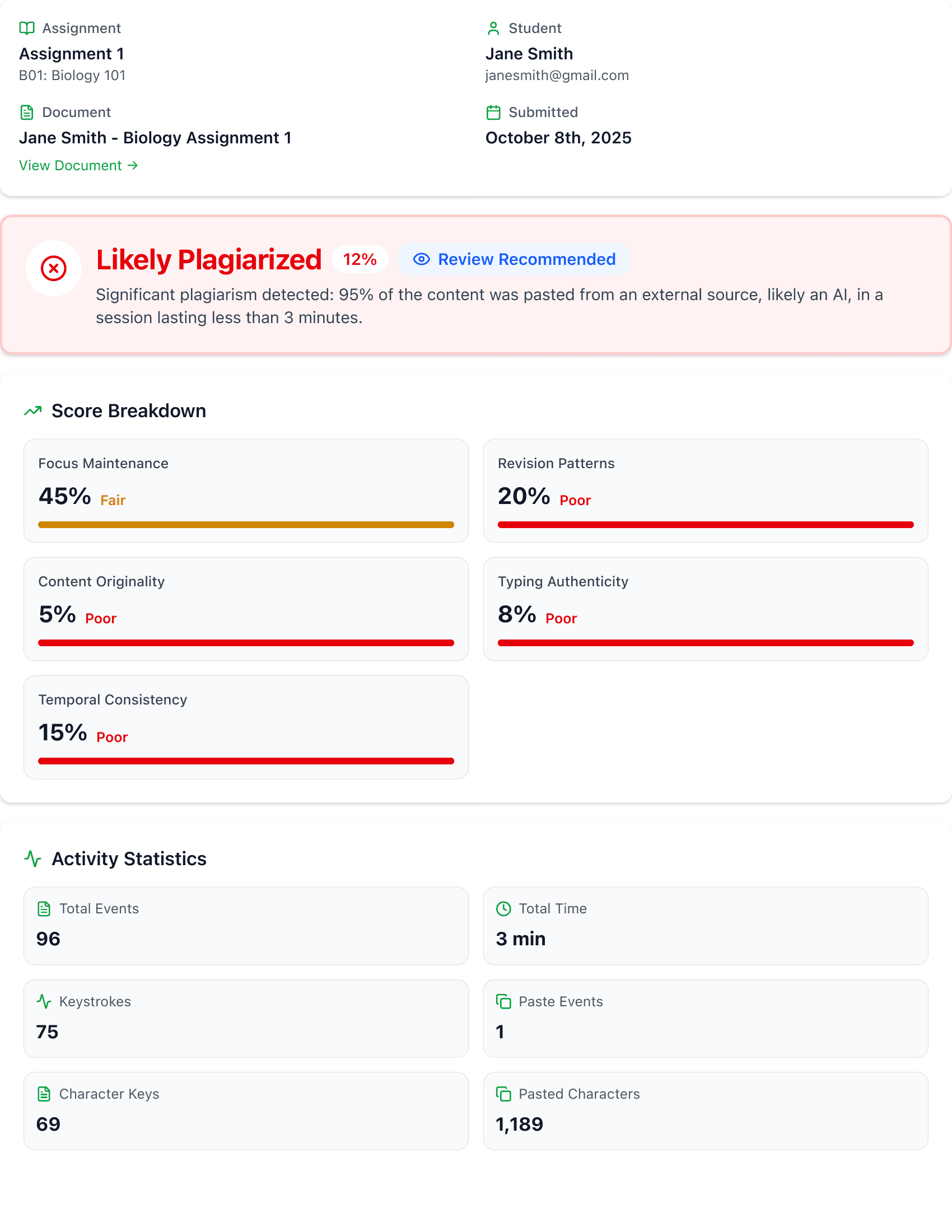
Context beyond the final document
WriteID organizes activity generated as submitted work develops in Google Docs, giving educators a clearer view of the writing process.
Typing patterns
Review timing, speed, and rhythm across a writing session to understand whether a document developed gradually and consistently.
Paste & clipboard events
See the volume and timing of copy-paste activity so imported material can be considered in the context of the wider writing process.
Focus & attention
Place tab switches and focus changes on the document timeline to help explain pauses and shifts during a writing session.
Revision history
See edits, deletions, and rewrites over time to understand how ideas were developed and refined before submission.
How WriteID works
Follow the writing process from the learner’s first draft to the tutor’s review.
For learners
Make your writing process visible.
Set up the WriteID extension
Use the WriteID browser extension and sign in with the Google account you use for Google Classroom. Your tutor will tell you which assignments use WriteID.
Open your assignment document
Open the Google Docs document attached to your Classroom assignment. When asked for document access, select that same document in the Google file picker to authorize WriteID to access it.
Write and revise in Google Docs
Keep the extension active as you develop your work. WriteID records writing activity, including typing, pasting, revisions, and focus changes, to give your tutor context about how the document came together.
Submit through Google Classroom
Turn in your assignment through your usual Classroom workflow. WriteID associates the recorded writing activity with the assignment document for authorship review.
Discuss your writing process
If your tutor asks about the report, explain your drafts, sources, and revisions. Writing activity supports that conversation; your tutor makes the final academic assessment.
For tutors
Review the evidence behind the submission.
Connect Google Classroom
Sign in to WriteID with your Google account and connect Google Classroom. Import the classes and assignments you want to review.
Prepare your learners
Tell learners which assignments use WriteID, explain what activity is recorded, and ask them to set up the extension before they begin writing in Google Docs.
Find the submitted work
Open the assignment in WriteID and select a learner’s submission. The associated Google Docs document and recorded activity provide the context for your review.
Generate an authorship report
Request a report for the submission. WriteID uses AI to examine typing patterns, paste activity, revisions, and timing, organizing the observations into an assessment and a breakdown by dimension.
Review and follow up
Read the report alongside the submitted work and assignment requirements. Discuss any concerns with the learner and consider their explanation before making a decision. A report is supporting evidence, not proof of misconduct.
Benefits for educators
WriteID turns document-development activity into useful context for fair, consistent, educator-led review.
Process-level context
Look beyond the final submission and understand how a piece of written work developed over time.
Fair, consistent review
Use the same structured evidence across submissions while keeping academic judgment in the educator's hands.
Efficient analysis
Generate a clear authorship report with one click instead of manually reconstructing the document's development.
Evidence-led conversations
Discuss specific observations from the writing process rather than relying only on impressions from the final document.
See the process. Review with confidence.
WriteID fits into the Google Classroom workflow you already use and turns document history into useful context for educator-led review.
Get started free